Operations / 04 of 15
Slack Channel Creation
Create your communication channel, invite your team, invite the user, and send introductory messages upon their arrival.
How it runs
Trigger
Client onboarded
Step 01
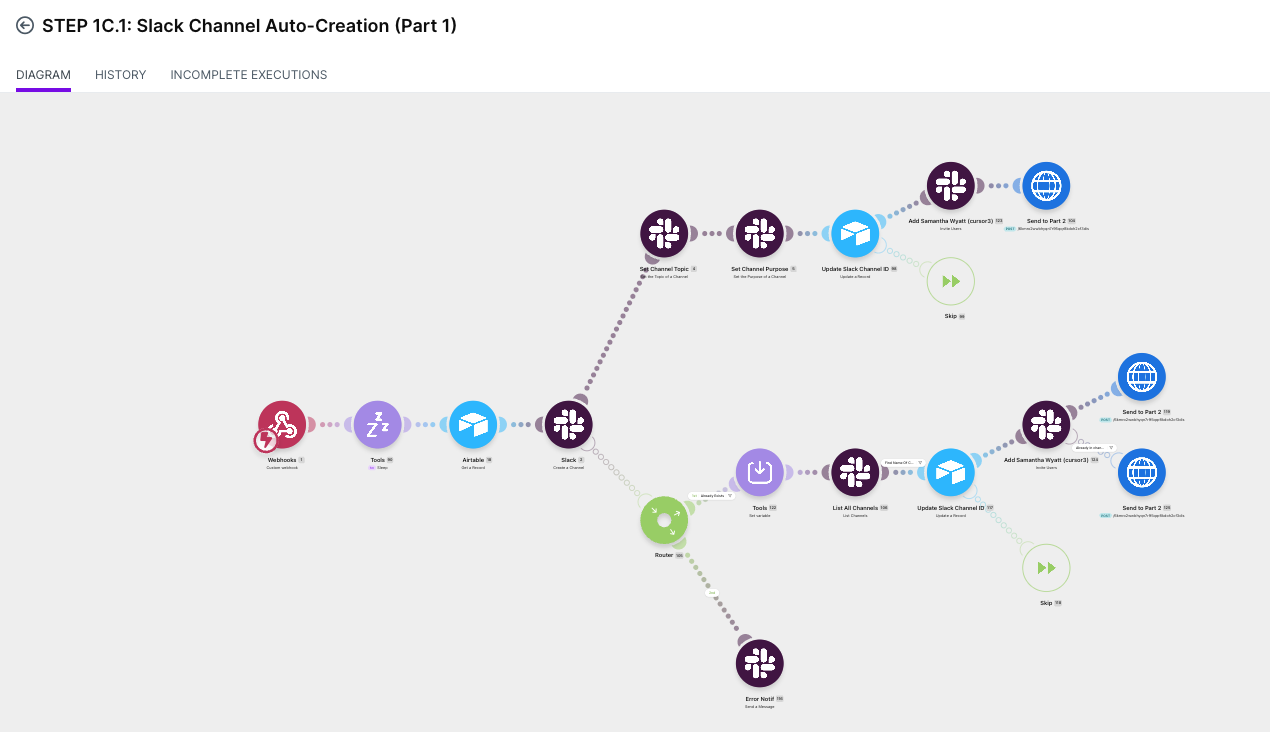
Create channel, naming applied
Step 02
Invite team from the pod table
Step 03
Invite client via Slack Connect
Step 04
Post intro, pin the essentials
Write-back
Write channel ID to the record
What it is
The client's channel gets created, named to convention, staffed from the assignment table, opened to them via Slack Connect and seeded with an intro message, before anyone thinks to do it.
You need this if channel creation is manual, happens late, gets named inconsistently, and someone always gets missed off the invite.
If you're already fast at this, the win is the write-back: every later automation knows where to post.
The actual build
What it does for you
The client has a live, staffed channel the moment they're onboarded
so the relationship starts before the work does.
Membership resolves from the assignment table
so the right people are in the room and nobody's forgotten.
The channel ID lands on the client record
so every future notification routes correctly with no manual mapping.
Built and running
Shipped for multiple businesses: Growthflare, Your Social Currency, Epic Ads Lab, School of Bots and CreoSocial. All reported improved communication and less time with manual activities upon onboarding.
Want this one built into your business?
Thirty minutes, no deck. We map what you run today and tell you what it would take.